To chair or not to chair?
How can a facilitator add value to a senior meeting without turning it into a structured workshop?
A recent senior meeting reminded me that facilitation does not always need to look like a workshop. Sometimes the value comes from turning the conversation back into something useful while it is still happening.
A different kind of session
I recently ran a session where the sponsor was very clear from the outset: this was less of a workshop and more like chairing a senior meeting.
That distinction mattered. There was no tightly designed agenda, no breakout activities, no canvases waiting to be filled in and no carefully engineered outputs. We had a handful of broad questions, a room of around 15 senior participants, and a significant amount of dense legal material to work through.
The lawyers in the room were comfortable with that. In fact, the supporting material was intentionally substantial: thick PowerPoints, lots of reading, lots of detail, and plenty for people to absorb before and during the conversation.
My initial concern was that I wasn't quite sure where I was going to add value. My normal world is more deliberately designed. I'm usually thinking about the shape of a workshop, the activities, the sequencing, the artefacts people will create, and the moments where we diverge and converge.
This session was going to be much looser.
Keep the transcript running
What I discovered was a different way of adding value — one that probably would not have been available to us even six to twelve months ago.
The meeting was entirely face-to-face, but I still set up Microsoft Teams and ran a live transcript throughout the session. Because everyone was physically in the same room, Teams could not reliably distinguish who was speaking. Most of the transcript effectively appeared under my name.
That turned out not to matter very much.
As the conversation unfolded, I kept a very light set of notes. I captured emerging themes and questions. When somebody said something particularly sharp, useful or memorable, I wrote down three things: who had said it, roughly when they had said it, and one or two words to remind me what the comment was about.
That was enough to find it again later.
Use the break for live synthesis
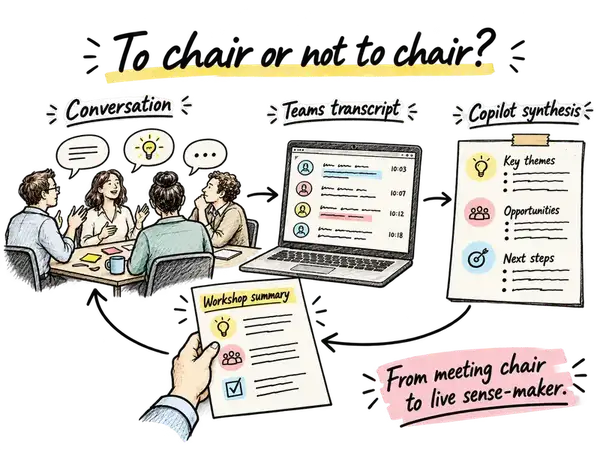
During the breaks, I could go back to the transcript and use Copilot to interrogate the conversation that had just happened.
I could ask for the main themes from the previous hour. I could ask it to summarise a particular part of the discussion. I could ask for the arguments or tensions sitting underneath one topic. And if I wanted to recover a particular comment, I could point it towards the approximate time and the keyword I had written down.
Suddenly, a fairly messy live conversation became much easier to work with.
Turn the synthesis into something tangible
The next step was equally simple. I would take the output from Copilot — perhaps four emerging themes and a short explanation of each — and paste it roughly into four PowerPoint slides. There was nothing elegant about the first draft. It was genuinely rough and ready.
Then I would use Copilot inside PowerPoint with a very basic instruction: clean these slides up and make them suitable for printing.
A few minutes later, I would do a quick accuracy check, make sure the summaries genuinely reflected the discussion and that nothing strange or invented had crept in, and send them to the printer.
By the time the participants came back from the break, there was a fresh summary sitting in the room waiting for them.
What came back into the room
That turned out to be incredibly useful. People could look at the pages and immediately reorient themselves. Yes, that is what we were talking about. Yes, those were the tensions. Yes, that captures the point we were trying to make.
Several participants commented on how accurate and helpful the summaries were.
What I found interesting was that these pages were not really minutes. They were not a comprehensive record of everything that had been said. They were also not a polished deliverable produced after the event.
They were something in between.
They were a live sense-making device.
The conversation happened. The transcript captured it. AI helped me compress and interrogate it. I turned that into something visual and tangible. And then that artefact went back into the room and helped shape the next part of the conversation.
Where the facilitator still adds value
For facilitators, I think this opens up another way of thinking about the value we can provide.
Sometimes our value comes from designing the activity. Sometimes it comes from asking the difficult question, managing the dynamics or helping a group make a decision. And sometimes, particularly in a looser senior conversation, our value may be in helping the room understand itself while the conversation is still happening.
There is another important point here: this did not require a production team. I was running the session alone.
Because there were no breakouts, complicated templates or moving pieces to coordinate, I had enough capacity during the breaks to do this myself. The technology did most of the mechanical work. My role was to listen, notice what mattered, ask the right questions of the transcript and make a judgement about what was worth putting back in front of the group.
AI was not facilitating the meeting. It was giving me more leverage as the person facilitating — or perhaps, in this case, chairing — the conversation.
The learning I'll carry forward
Not every session needs to become a highly designed workshop. Sometimes the right format genuinely is a senior conversation around a table with good material and good questions.
But even in those sessions, we now have new ways to create structure, memory and momentum around the conversation as it unfolds.
What new forms of value can we now add to a room that simply were not practical a year ago?