Scenarios stretch thinking
Using imagined futures to help participants plan for situations that are difficult to picture from today's vantage point.
Read the full field note →Notes from the margins
Practical field notes from designing and facilitating workshops: the questions, experiments and lessons that help sponsors, teams and facilitators think better together.
Not “thought leadership”. Just thoughts.Using imagined futures to help participants plan for situations that are difficult to picture from today's vantage point.
Read the full field note →How a carefully seeded question can help a group get moving without the facilitator pre-solving the problem.
Read the full field note →A canvas quietly tells participants what to pay attention to — and therefore shapes how they think about the challenge.
Read the full field note →Paper can still be brilliant. But when a workshop pattern becomes predictable, HTML gives us another material for participation.
Read the full field note →Individual reflection does not always need to come first. Sometimes the shared picture and other people's perspectives are what make the quiet thinking useful.
Read the full field note →Most workshop outputs capture where the room landed. In a recent face-to-face session, selective recording and fast AI summaries created a visible memory of how the thinking developed.
Read the full field note →Workshop prep is knowledge transfer as much as logistics. I built a small AI podcast tool to turn dense source material into a traceable conversation I could listen to on the move.
Read the full field note →Everyone was face-to-face, but every meaningful piece of work was captured digitally, live. That gave the room something extra: a shared memory we could interrogate while the workshop was still happening.
Read the full field note →A workshop output pack should do more than prove the workshop happened. Done well, it becomes a readable record of the conversation, the thinking and the decisions — and something people and AI can actually use afterwards.
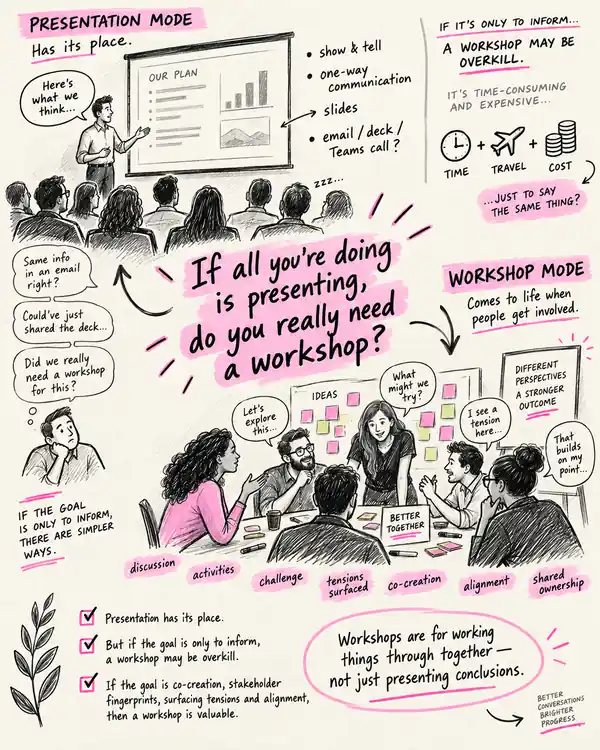
Read the full field note →If the goal is simply to inform people, there are easier ways. Workshops earn their keep when people need to discuss, challenge, shape and align together.
Read the full field note →“Next steps” are useful. But going one level deeper can make the handover clearer and give the work a better chance of surviving after the workshop.
Read the full field note →Not every useful session needs activities and breakouts. Sometimes the facilitator's value is helping a room understand itself while the conversation is still happening.
Read the full field note →A beautifully facilitated exercise can still be the wrong exercise. I care less about whether the method is fashionable and more about whether it makes the next piece of thinking easier, sharper or more honest.
How do you stop a strategy workshop being limited by today's assumptions?
When a group is anchored to today's constraints, asking them to imagine a few plausible futures can expose assumptions that an ordinary planning conversation never reaches.
Most planning starts from an implicit assumption that tomorrow will be a slightly altered version of today. Scenarios interrupt that habit. They give a group permission to ask what changes if the context changes — and which current assumptions suddenly stop being useful.
Offer two or three deliberately different but plausible futures. Ask: what becomes more important, what breaks, what would we regret not preparing for, and which decisions still make sense in every scenario?
A scenario is not a prediction exercise and it is not theatre. If the imagined future does not change the questions the group is asking, it probably is not stretching the thinking enough.
How do you get a workshop moving without steering people towards your answer?
A blank page can slow a room down. A carefully chosen question can give people a useful place to start without telling them where they should finish.
Facilitators sometimes seed content because they are worried the group will stall. The safer move is to seed the inquiry instead: give participants a strong question that opens territory while leaving the answer genuinely theirs.
Prepare three to five provocative but neutral questions. Put them on the wall or canvas before the discussion starts. Invite people to ignore them, rewrite them or add better questions if the room sees something you did not.
A seeded question should not contain the facilitator's answer in disguise. If there is only one respectable way to respond, it is probably a leading question rather than a useful seed.
Is your workshop canvas helping people think, or just giving them somewhere to put notes?
A canvas is not just somewhere to put Post-its. Its structure quietly tells a group what to notice, what to compare and how to move through a problem.
Every canvas contains a point of view. The headings, sequence, size of boxes and amount of space given to each prompt all influence what participants spend time thinking about. That makes the canvas part of the facilitation design.
Start with the thinking you need, not a favourite template. Ask what participants must notice first, what deserves equal weight, what should be compared, and what needs to converge into a decision.
An inherited canvas can make a group solve the wrong problem very efficiently. More boxes also do not mean more rigor. If a section does not change the next piece of thinking, question whether it belongs.
What do you do when participants are going through the motions with familiar workshop activities?
Paper and Post-its can help people think with their hands. But when the room already knows exactly what is coming, familiarity can become paint-by-numbers. A small HTML experience gives us another material to design with — while keeping the actual thinking between human beings.
I still love tactile workshop materials. There is something useful about writing by hand, standing up, moving an idea and physically seeing a conversation take shape around you. But after enough workshops, the sequence can also become a little too familiar: prompt, Post-it, cluster, vote, repeat.
Recently I have been experimenting with small, purpose-built HTML files created with tools like Copilot and ChatGPT. Because an HTML file simply runs in a browser, it can feel like a tiny website built for one moment in the agenda. A touch screen can become a game board. A set of choices can move, animate, reveal consequences or force a trade-off. Participants can travel through a scenario, rank options, spend a fictional budget or build something together on screen.
The technology is not the point. The interesting bit is the marriage between the digital object and the human conversation around it. The screen visualises the discussion, makes a constraint tangible or introduces a little surprise. The alignment still comes from people explaining, challenging, listening and deciding together.
Find one point in the agenda where the group needs to make a real trade-off. Instead of explaining the constraint, make the constraint interactive. As an example, I rebuilt a Leadership Principles exercise in which a group has $600, every principle costs $100, and they must invest in exactly six: two top priorities and four supporting priorities. Once the money is spent, a Check the balance button surfaces possible reinforcing pairs and counterbalances for the group to argue with.
Try the Leadership Principles Tension Lab →
Don't use the result as an answer. Use it as something worth disagreeing with.
Technology introduces a new failure mode: the activity can work beautifully for 25 minutes and then a refresh, closed tab or browser problem can wipe out the visible state. For anything that matters, I would build two layers of protection into the HTML: autosave the current state locally in the browser, and provide a clear Save / Export action that downloads a snapshot of the workshop output.
That distinction matters. A normal browser page cannot silently keep overwriting a file on someone's device without permission. So design the recovery path as deliberately as the interaction itself — and make sure the activity still has a human fallback if the screen decides not to cooperate.
When does individual reflection work better after the group conversation?
We often design workshops to build from the individual up. But sometimes the most useful insight comes when we start with the big picture together, then gradually zoom in toward the individual.
Collaboration does not have to start with the individual. There can be real value in doing it in reverse: start with the full group, move to smaller groups, then finish with individual reflection.
In a recent workshop exploring Gallup Strengths, we started with the team view of the data, moved into small groups using handwritten cue cards, and finally gave people quiet space to reflect on what the team picture and other people's perspectives meant for them personally.
The result was richer conversation and deeper individual insight.
See together → talk together → think alone.
How do you preserve the thinking between workshop activities, rather than just the final outputs?
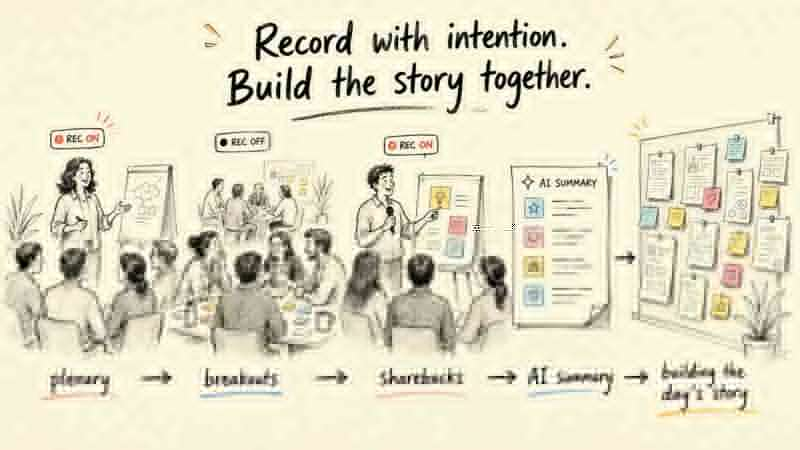
Most workshop outputs capture where the room landed. In a recent face-to-face session, selective recording and fast AI summaries created a visible memory of how the thinking developed.
A lot of useful workshop thinking disappears almost as quickly as it happens. We remember the Post-its and the final decisions, but the thread connecting one conversation to the next is harder to hold onto.
With the group's permission, we selectively recorded plenary conversations, activity instructions and participant sharebacks. We switched recording off for breakout discussions. After each recorded section, we used the transcript to create a short AI summary, printed it, and added it to the wall.
Over the day, the wall became a visible memory of the workshop — not a verbatim transcript, but a trace of how the thinking developed.
Record selectively → distil quickly → make the thinking visible.
How do you get across a large pack of unfamiliar material before designing a workshop?
Workshop preparation is not only logistics, agendas and activities. Sometimes the hardest part is becoming useful enough in someone else's world, quickly enough to design a good room.
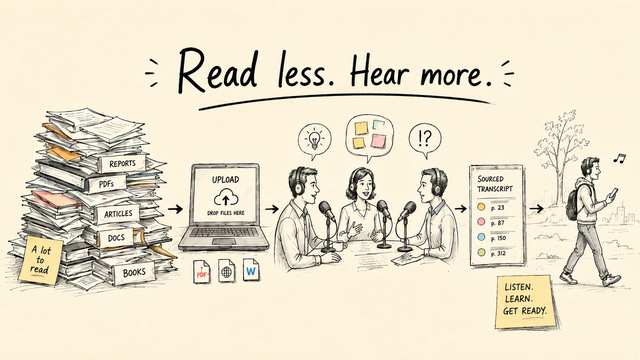
A one-minute HTML loop: bring in the source material, map it, make the evidence traceable, turn it into conversation, then listen while the rest of the day keeps moving.
PDFs, internal briefs, Word documents and useful web pages go into one source pack. The point is not to skip the material; it is to give the learning somewhere to start.
The AI first looks across the pack for themes, patterns, tensions and decisions. That gives the later conversation a map of the whole territory rather than letting the first interesting section dominate.
Each important claim carries its source and page. That small transparency layer exposed my biggest problem: one early podcast sounded comprehensive but was drawing almost entirely from about pages 190–220 of a roughly 450-page PDF.
Shorter turns, different voices, challenge, interruption and the occasional “um” or “hang on” made a surprising difference. The information did not change. My willingness to stay with it did.
The finished episode can come with me on a walk, in the car or between pieces of work. When something matters, the source tags tell me exactly where to return to the original material.
There is a part of workshop preparation that rarely appears on the run sheet: learning the problem space. Before I can design useful questions, activities or decisions, I often need to get far enough inside somebody else's context to understand the language, the tensions and the things that are genuinely difficult.
That can mean a lot of material. A sponsor or design team might send internal strategy papers, technical reports, previous workshop outputs, websites, Word documents or books. The content can be unfamiliar and dense, and the expectation is often that I absorb it quickly while still doing the rest of the job — delivering other workshops, preparing the room, working through logistics and, like most people, having a life outside work.
I kept finding the same bottleneck: the material was useful, but the uninterrupted hours needed to read it properly were hard to find.
So I built a different way into the material.Over a couple of days I built a small AI podcast tool. I can give it PDFs, web pages and documents and ask it to first understand the source pack: identify themes, patterns, points of tension, decisions, competing arguments and areas worth questioning. From there it creates a conversation between two or three speakers and turns that conversation into audio.
The intention was never “450 pages become 20 minutes, therefore I have read the report.” That would be a dangerous shortcut. The intention was to create another learning surface — something that could help me build a map of unfamiliar territory while walking, driving or doing the less cognitively demanding parts of my day, and then tell me where to go back into the original source when something deserved more attention.
I know tools that create podcasts from source material already exist. Building my own was partly curiosity, but control mattered too. I wanted to experiment with the roles the speakers played, the kinds of questions they asked, the voices and accents, the rhythm of the discussion, how much challenge appeared in the conversation and, eventually, whether every important point could show me the source it came from.
The obvious benefit is time. Audio lets some knowledge transfer happen in parts of the day where reading simply will not. But the more interesting benefit was that a conversation did something a conventional summary did not.
One speaker could state the apparent conclusion. Another could question it. A third could connect it to a different source or ask what it might mean in practice. That small amount of friction made the material feel less like compressed information and more like thinking I could participate in.
The interface was the conversation.My earliest versions were technically fine and surprisingly unpleasant to listen to. Speaker one would talk for close to a minute. Pause. Speaker two would take a turn. Pause. Speaker three would follow. It was orderly, clear and completely lifeless.
Shorter turns made a difference. So did different voice qualities, occasional overlap, a challenge arriving before the previous thought had completely settled, and small natural imperfections — an “um”, a “right”, a “hang on”. I did not need the speakers to pretend to be human. I did need the listening experience to have enough rhythm and variation that my attention stayed with it.
I tested the tool with a roughly 450-page PDF. The podcast sounded informed. It had detail, examples and a coherent narrative. As an experiment, I changed the tool so I could see the generated transcript alongside the exact source pages supporting each part.
That changed everything. Almost the entire episode was being built from a narrow part of the document — roughly pages 190 to 220. The tool had depth, but nowhere near enough breadth. And because the output sounded fluent, I could easily have mistaken “detailed” for “representative”.
That led to a redesign of the ingestion step. Instead of finding useful chunks and immediately writing from them, the tool first maps the document, deliberately allocates attention across sections, checks coverage and balances multiple uploaded sources before the script is written.
For this one, the useful work happens before anybody walks into the room. I would treat it as a learning loop rather than a document-to-podcast conversion.
Source material → conversation → better questions → better room.
The main danger is not that the podcast will obviously fail. It is that it will sound good enough to trust too quickly.
The most useful outcome for me has not been a podcast library. It has been a better way of thinking about workshop preparation. Knowledge uplift is part of the design work. If I can make that learning more accessible without losing the ability to interrogate the source, I arrive in the room with better questions — and usually a much better sense of what the room actually needs to do.
How do you capture a face-to-face workshop digitally without losing the human conversation?
The workshop was 100% face-to-face. The working memory was 100% digital. That combination created a much richer view of what the room was actually thinking.
There is an assumption we sometimes make in workshop design that face-to-face means physical materials. Post-its, butcher's paper, flipcharts, walls covered in outputs. I still like all of those things.
But recently I helped run a workshop where the sponsor was very clear on two things. First, everyone needed to be physically together. The connection, challenge, side conversations and ability to read the room really mattered. Second, all of the work needed to be captured digitally, live, as the workshop happened.
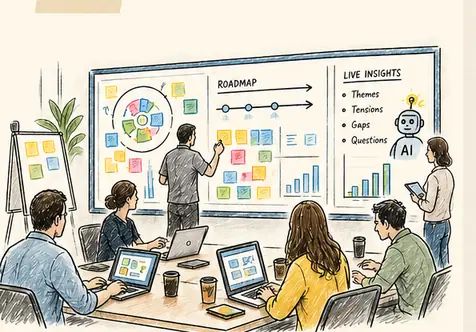
So we built the day around a digital whiteboard. Different areas of the board supported different activities. Participants had access. Templates were ready. There were places for vendor input, prioritisation, roadmaps, breakout thinking and sharebacks.
During plenary sessions, participants added thoughts and questions directly onto the board. When they moved into physical breakout rooms, the conversation still happened face-to-face, but the work they produced appeared on the same shared board as it developed. When groups came back together, their sharebacks were anchored in the live material they had just created.
The whiteboard stopped being a digital substitute for a wall. It became a live representation of the workshop.
The most interesting part came when we added AI into that digital layer.
Instead of waiting until the end of the workshop to work out what had happened, we could focus on the board overall or zoom into the section where a particular activity had taken place and ask questions of it almost immediately.
That was particularly useful for the sponsor. In a traditional workshop, one person cannot sit in three or four breakout rooms at once. They hear the shareback, but a lot of the nuance that produced it has already disappeared.
Here, the sponsor could see what was being created across the room and use the digital record to decide where they wanted to dig further. Sometimes the interesting thing was not the answer a group had reached. It was the tension underneath it. Or something one group had raised that another group had ignored. Or a question that kept appearing in different parts of the board.
The transcript added another layer. Because the plenary parts of the session were recorded, we could put what people had said alongside what they had created. The whiteboard gave us the artefacts. The transcript gave us the conversation around them.
Together, they gave us a much richer record of the day. AI could help connect the two: summarising a particular activity, surfacing friction, pulling out unresolved questions, or helping build a narrative of how the group's thinking shifted over time.
That felt quite different from simply “using AI in a workshop”. The AI wasn't there to tell participants what to think. It was helping us see more clearly what they had already thought.
The workshop still felt physical. That mattered.
People moved. They stood around screens. They went into different rooms. They challenged each other. They came back together. They presented. The technology didn't replace those behaviours. It sat underneath them.
A room full of people quietly typing into laptops for eight hours would technically create excellent digital capture. It would also be a fairly terrible workshop.
So part of the design challenge became deciding when people needed the screen and when they needed each other.
The digital board was the common workspace. It didn't have to become the activity itself.
If I were doing this again, I'd think about the digital workspace almost as carefully as the physical room.
Discuss face-to-face → capture digitally → analyse live → ask better questions.
The obvious risk is technology getting in the way of the workshop.
Movement matters. Breakouts matter. Standing up matters. Changing rooms matters. Talking without typing matters.
The useful version is not physical or digital. It is physical collaboration with a digital layer underneath it.
How do you turn workshop photos and Post-its into an output pack people can actually use?
The workshop shouldn't finish when everyone walks out of the room. And the output pack shouldn't be a collection of happy snaps, unreadable Post-its and photos of people standing beside flipcharts.
I've seen plenty of workshop output packs that are really just photo albums.
A title slide. A copy of the agenda. Photos of the activities. Photos of the walls. Maybe a few pictures of participants looking suitably collaborative. Then fifty slides of Post-its that nobody can actually read.
There is nothing particularly wrong with keeping those things. They are part of the record. But I think the output pack can do much more.
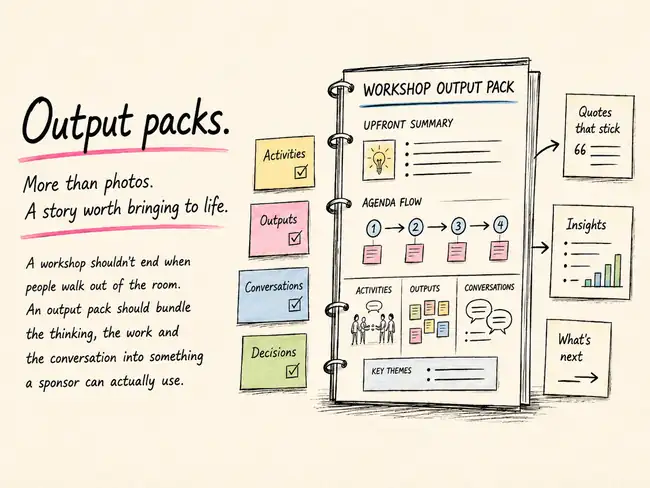
For me, it is an opportunity to pull the workshop back together after the room has emptied: a little bit of the activities, a little bit of what people produced, a little bit of what they actually said, and some of the thinking that shaped the design in the first place.
My preference is simple. Start with a short summary, then follow the workshop agenda. If activity one led to activity two, which changed the conversation going into activity three, the output pack should make that journey visible.
If it was a two-day workshop, I want to be able to see the two days. If there was an important conversation before lunch that influenced a decision after lunch, I want that thread to survive.
The most useful output packs combine a few different kinds of evidence.
There are the artefacts people made: Post-its, canvases, roadmaps, prioritisation exercises and drawings. There are the conversations around those artefacts. There are the facilitator's observations and notes. And sometimes there is a transcript from parts of the workshop that were recorded.
Those things become much more useful when they are brought together.
A photo of a prioritisation activity is useful context. The actual priorities written underneath it are more useful. A picture of a wall covered in Post-its shows the energy in the room. A short synthesis of the themes on that wall tells me what the room was thinking.
This is one place where AI has made the work noticeably easier. Modern OCR can often take handwritten or printed material visible in workshop photos and turn it into usable text.
That matters for readability. But there is another benefit that is becoming increasingly important.
In many organisations, internal AI tools will have a much easier time working with properly structured text in a PowerPoint or document than they will trying to interpret dozens of photographs buried inside it.
If I want to ask later what the recurring themes were, where tensions appeared, how this workshop compares with another one, or what decisions were made, machine-readable text gives me a much better starting point than a folder full of wall photographs.
There is an obvious problem with all of this: workshop handwriting.
Sharpies, rushed Post-its, strange angles, half-finished sentences and handwriting that even the person who wrote it struggles to recognise an hour later.
OCR is improving, but it is not magic.
One of the simplest habits I value happens after everyone has left. Before pulling down the walls, walk the room. Activity by activity. Cluster by cluster. Post-it by Post-it.
And simply read the content aloud into your phone.
It sounds laborious. It really isn't. You can move through a wall surprisingly quickly. Now you have a transcript.
That transcript can sit beside the photographs, which means the visual record stays intact while the content becomes searchable, readable and much easier to synthesise.
You can keep important comments verbatim, group similar ideas, produce a cleaner summary, or hand the transcript and the images to AI together and ask it to help reconstruct the activity.
For a few extra minutes at the end of the day, you have rescued a lot of thinking that might otherwise disappear into an unreadable JPEG.
I also think it helps to separate two jobs.
First: capture the story.
Get the photographs in. Get the activities in the right order. Add the transcript. Pull out the quotes. Add the decisions. Summarise the themes. Make sure the story is basically right.
Then: make it look good.
This is another area where tools like ChatGPT, Claude and Copilot have changed the effort involved. A rough PowerPoint can now become a reasonably polished one very quickly.
The starting point does not need to be beautiful. It needs to contain the right material and a sensible structure.
Then you can ask for help tightening the hierarchy, reducing clutter, improving consistency, making the slides more readable and turning something functional into something you would actually want to send to a sponsor.
That feels like a much better use of time than spending hours manually nudging text boxes around while the actual workshop content is still sitting untranslated on the wall.
Photo → transcription → synthesis → story.
The biggest risk is confusing more content with a better output pack.
Nobody wants a 140-slide forensic record of every Post-it produced during the day. The sponsor needs enough detail to trust the summary and enough structure to find the deeper material when they need it.
If a slide deck still feels too static, the same material can always become something more interactive — including the sort of simple click-through HTML format I've written about elsewhere.
If the objective is simply to inform people, a workshop may be an expensive way to do something an email, a deck or a short call could do. The value starts when people are there to shape, challenge and align together.
I've seen this a few times.
A workshop sponsor, usually with very good intentions, has already put together the agenda before we really get into the design.
And on first inspection, it looks pretty good.
There's a logical sequence. Clear sections. Sensible timings. Breaks in the right places. Often quite a lot of thought and effort has gone into it.
But then you look a little closer.
Twenty minutes of context. Thirty minutes of research findings. Another presentation on the proposed approach. A project update. A presentation from another team. Questions at the end.
And you realise something.
Which raises a fairly simple question: if all you're doing is presenting, why do you need a workshop at all?
If the objective is simply to inform people, there are much easier ways to do it.
Send the deck. Write an email. Record a video. Run a short Teams call.
Do the research, make the decision, explain the logic and tell people where you're heading.
There is absolutely a place for that. But it's worth being clear about what it is.
It's communication, not co-creation.
Bringing a group of people together is expensive.
Not just in venue costs, travel or accommodation, but in the collective time of everyone sitting in the room.
Ten senior people spending half a day together is a significant investment.
So the question I increasingly find useful is:
That is where the value of a workshop starts to become clearer.
A good workshop creates space for people to:
Most of that doesn't happen while somebody is standing at the front of the room clicking through slides.
It happens in the conversations between people.
That doesn't mean workshops shouldn't contain presentations.
They often should.
People need context. They need evidence. They need to understand the problem they are being asked to work on.
But the presentation should usually be there in service of the conversation, rather than becoming the conversation.
Five or ten minutes of context might unlock forty minutes of valuable discussion.
A simple provocation might be more useful than twenty slides of explanation.
A piece of research might be introduced briefly, then handed over to participants to interrogate, challenge and build upon.
The aim isn't to demonstrate how much work has already been done.
The aim is to give people enough to work with.
Another version of this appears when a small team has already done a lot of excellent work.
They've conducted the research. They've analysed the options. They've developed the recommendation. They've mapped out the direction.
Then everyone else is invited into a workshop and walked through the answer.
Again, none of that work is inherently wrong.
Sometimes that's exactly what needs to happen.
But if we then describe the session as co-creation, we should probably challenge ourselves.
Because people can tell the difference between being invited to shape something and being invited to react to something that has already been decided.
If we genuinely want people to have their fingerprints on the outcome, there has to be something meaningful left for them to influence.
That might mean shaping the direction. Testing assumptions. Working through trade-offs. Identifying risks. Challenging the research. Prioritising options. Or simply surfacing tensions that haven't yet been resolved.
Without that space, participation can become theatre.
It might be:
If the answer is: “We need them to understand what we've decided.”
You may not need a workshop.
If the answer is:
Then a workshop may be exactly the right tool.
And the agenda should reflect that.
Less time presenting conclusions. More time working things through together.
Because workshops aren't valuable simply because people are in the same room.
They're valuable because of what becomes possible when those people actually get involved.
Before building the agenda, ask one question: what genuinely needs the room?
Put the information transfer elsewhere where you can. Pre-reading, a short deck, a recording or a concise opening can carry the context. Protect the face-to-face or live time for the parts that need interaction: sense-making, challenge, trade-offs, tension, decision-making and alignment.
If the important decisions are already fixed, say so. Consultation can still be useful, but don't design participation that implies people have influence they do not actually have.
Inform outside the room where you can. Use the room for the thinking that needs other people.
Why do people leave a workshop feeling aligned, then return with different interpretations of what was decided?
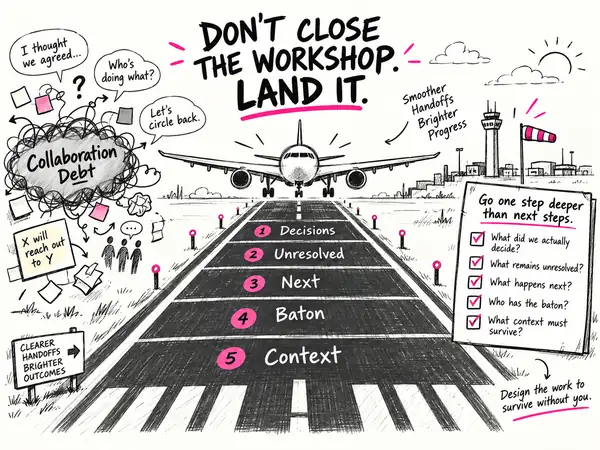
A workshop can create clarity and alignment in the room, then lose it again on the way out. “Next steps” help. Designing the landing goes one level deeper.
We spend a lot of time designing what happens inside a workshop. We think carefully about the questions, activities, sequence, room and conversations we want people to have. We try to create the conditions for good thinking, useful challenge, alignment and progress.
But I’m increasingly wondering whether we spend enough time designing what happens immediately after the workshop.
I’ve been thinking about the idea of collaboration debt. It describes the friction that builds when gaps in process, relationships and information are left unresolved. Context gets lost, decisions are revisited, and people leave with different interpretations of what happened. None of these things may feel significant in the moment, but over time they make collaboration slower and harder.
A well-designed workshop should help reduce some of that debt. It can bring different perspectives into the same room, surface assumptions, build shared context and help people make progress.
A group can leave feeling aligned without necessarily being aligned. One person may believe a decision was made, while someone else thinks it was only discussed. The room may have been full of energy and useful thinking, but a week later nobody is quite sure what happened next.
This is where the familiar workshop question of “what are the next steps?” starts to matter.
Most workshops already try to close this way, and rightly so. The challenge is that the answers can still be surprisingly vague. “Sarah will speak to James.” “We’ll socialise this with leadership.” “We’ll come back together in a few weeks.”
These sound like actions, but they don’t always give the work enough momentum to survive beyond the session. What is Sarah speaking to James about? Is James being asked to decide something, approve something, or simply be informed? What does “socialise” actually mean? Who is responsible for moving things forward?
So perhaps the opportunity isn’t to replace next steps. It is to go one level deeper.
Instead of asking only what happens next, we can be more explicit. What did we actually decide? What remains unresolved? What is the next meaningful movement of the work? Who now has the baton? What context or shared understanding needs to survive once people return to their day jobs?
These questions are still, in a sense, next steps. They simply force greater precision. They separate decisions from open questions, ownership from activity, and action from intention.
Importantly, this doesn’t mean the facilitator becomes the project manager. It doesn’t mean chasing actions, running stand-ups or staying attached to the work. Responsibility for delivery should still sit with the sponsor and the team who own it.
The facilitator’s role is different.
That has made me wonder whether “close” is the wrong way to think about the final stage of a workshop.
Closing tells us the session is finished.
Landing asks whether the work is ready to continue once the session is finished.
The question shifts from “Have we finished the workshop?” to “Have we designed the work to survive without us?”
Because the real value of a workshop isn’t the energy in the room, the number of Post-it notes on the wall or even the clarity people feel at 4:30pm. The value is what people are able to do differently afterwards.
So perhaps the final responsibility of a facilitator isn’t simply to bring the workshop to a good close.
Perhaps it is to design the landing.
Keep asking for next steps, but make the closing conversation more deliberate. Before the room breaks, work through five lenses: Decisions, Unresolved, Next, Baton and Context. The aim isn’t to create a detailed delivery plan. It is to make the handover explicit enough that the people who own the work can pick it up without having to reconstruct the workshop a week later.
Landing should not become a heavy project-management ritual. The point is not to capture every action or keep the facilitator involved indefinitely. It is to remove the most important ambiguity while the people, context and decisions are still in the room.
How can a facilitator add value to a senior meeting without turning it into a structured workshop?
A recent senior meeting reminded me that facilitation does not always need to look like a workshop. Sometimes the value comes from turning the conversation back into something useful while it is still happening.
I recently ran a session where the sponsor was very clear from the outset: this was less of a workshop and more like chairing a senior meeting.
That distinction mattered. There was no tightly designed agenda, no breakout activities, no canvases waiting to be filled in and no carefully engineered outputs. We had a handful of broad questions, a room of around 15 senior participants, and a significant amount of dense legal material to work through.
The lawyers in the room were comfortable with that. In fact, the supporting material was intentionally substantial: thick PowerPoints, lots of reading, lots of detail, and plenty for people to absorb before and during the conversation.
My initial concern was that I wasn't quite sure where I was going to add value. My normal world is more deliberately designed. I'm usually thinking about the shape of a workshop, the activities, the sequencing, the artefacts people will create, and the moments where we diverge and converge.
This session was going to be much looser.
What I discovered was a different way of adding value — one that probably would not have been available to us even six to twelve months ago.
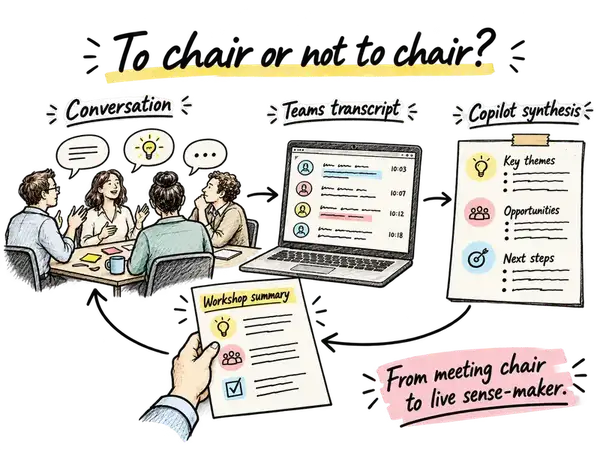
The meeting was entirely face-to-face, but I still set up Microsoft Teams and ran a live transcript throughout the session. Because everyone was physically in the same room, Teams could not reliably distinguish who was speaking. Most of the transcript effectively appeared under my name.
That turned out not to matter very much.
As the conversation unfolded, I kept a very light set of notes. I captured emerging themes and questions. When somebody said something particularly sharp, useful or memorable, I wrote down three things: who had said it, roughly when they had said it, and one or two words to remind me what the comment was about.
That was enough to find it again later.
During the breaks, I could go back to the transcript and use Copilot to interrogate the conversation that had just happened.
I could ask for the main themes from the previous hour. I could ask it to summarise a particular part of the discussion. I could ask for the arguments or tensions sitting underneath one topic. And if I wanted to recover a particular comment, I could point it towards the approximate time and the keyword I had written down.
Suddenly, a fairly messy live conversation became much easier to work with.
The next step was equally simple. I would take the output from Copilot — perhaps four emerging themes and a short explanation of each — and paste it roughly into four PowerPoint slides. There was nothing elegant about the first draft. It was genuinely rough and ready.
Then I would use Copilot inside PowerPoint with a very basic instruction: clean these slides up and make them suitable for printing.
A few minutes later, I would do a quick accuracy check, make sure the summaries genuinely reflected the discussion and that nothing strange or invented had crept in, and send them to the printer.
By the time the participants came back from the break, there was a fresh summary sitting in the room waiting for them.
That turned out to be incredibly useful. People could look at the pages and immediately reorient themselves. Yes, that is what we were talking about. Yes, those were the tensions. Yes, that captures the point we were trying to make.
Several participants commented on how accurate and helpful the summaries were.
What I found interesting was that these pages were not really minutes. They were not a comprehensive record of everything that had been said. They were also not a polished deliverable produced after the event.
They were something in between.
They were a live sense-making device.
The conversation happened. The transcript captured it. AI helped me compress and interrogate it. I turned that into something visual and tangible. And then that artefact went back into the room and helped shape the next part of the conversation.
For facilitators, I think this opens up another way of thinking about the value we can provide.
Sometimes our value comes from designing the activity. Sometimes it comes from asking the difficult question, managing the dynamics or helping a group make a decision. And sometimes, particularly in a looser senior conversation, our value may be in helping the room understand itself while the conversation is still happening.
There is another important point here: this did not require a production team. I was running the session alone.
Because there were no breakouts, complicated templates or moving pieces to coordinate, I had enough capacity during the breaks to do this myself. The technology did most of the mechanical work. My role was to listen, notice what mattered, ask the right questions of the transcript and make a judgement about what was worth putting back in front of the group.
AI was not facilitating the meeting. It was giving me more leverage as the person facilitating — or perhaps, in this case, chairing — the conversation.
Not every session needs to become a highly designed workshop. Sometimes the right format genuinely is a senior conversation around a table with good material and good questions.
But even in those sessions, we now have new ways to create structure, memory and momentum around the conversation as it unfolds.
What new forms of value can we now add to a room that simply were not practical a year ago?