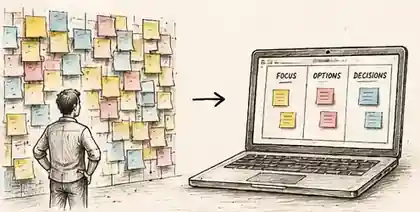
When Post-its become wallpaper.
What do you do when participants are going through the motions with familiar workshop activities?
Paper and Post-its can help people think with their hands. But when the room already knows exactly what is coming, familiarity can become paint-by-numbers. A small HTML experience gives us another material to design with — while keeping the actual thinking between human beings.
The thought
I still love tactile workshop materials. There is something useful about writing by hand, standing up, moving an idea and physically seeing a conversation take shape around you. But after enough workshops, the sequence can also become a little too familiar: prompt, Post-it, cluster, vote, repeat.
Recently I have been experimenting with small, purpose-built HTML files created with tools like Copilot and ChatGPT. Because an HTML file simply runs in a browser, it can feel like a tiny website built for one moment in the agenda. A touch screen can become a game board. A set of choices can move, animate, reveal consequences or force a trade-off. Participants can travel through a scenario, rank options, spend a fictional budget or build something together on screen.
The technology is not the point. The interesting bit is the marriage between the digital object and the human conversation around it. The screen visualises the discussion, makes a constraint tangible or introduces a little surprise. The alignment still comes from people explaining, challenging, listening and deciding together.
Why it helps
- It resets attention. People know what PowerPoint and Post-its usually ask of them. A different interaction can put the room back into discovery mode.
- It makes trade-offs visible. Budgets, limits, dependencies and consequences can be built directly into the activity rather than explained in a slide.
- It can still be physical and shared. On a large touch screen, participants can stand, point, move and negotiate together rather than disappearing into individual laptops.
- It is increasingly practical to tailor. With AI helping with the code, a facilitator can build a lightweight interaction around the sponsor's actual problem instead of reaching for a generic template.
Try it in the room
Find one point in the agenda where the group needs to make a real trade-off. Instead of explaining the constraint, make the constraint interactive. As an example, I rebuilt a Leadership Principles exercise in which a group has $600, every principle costs $100, and they must invest in exactly six: two top priorities and four supporting priorities. Once the money is spent, a Check the balance button surfaces possible reinforcing pairs and counterbalances for the group to argue with.
Try the Leadership Principles Tension Lab →
Don't use the result as an answer. Use it as something worth disagreeing with.
Watch for
Technology introduces a new failure mode: the activity can work beautifully for 25 minutes and then a refresh, closed tab or browser problem can wipe out the visible state. For anything that matters, I would build two layers of protection into the HTML: autosave the current state locally in the browser, and provide a clear Save / Export action that downloads a snapshot of the workshop output.
That distinction matters. A normal browser page cannot silently keep overwriting a file on someone's device without permission. So design the recovery path as deliberately as the interaction itself — and make sure the activity still has a human fallback if the screen decides not to cooperate.